
In a recent campaign to improve our front-end web performance at HubSpot, we learned a simple but important lesson:
Async != Fast
Javascript heavy apps and libraries have become much more prevalent on the web, and HubSpot is no different. We use Backbone on the client which consumes a handful of any of our hundreds of API endpoints via AJAX. We also load third party libraries with script tags at the end of the body. Even though all these scripts and requests are happening asynchronously, it's very dangerous and downright wrong to think that your app won't suffer a performance hit because of them. This means that you cannot just add extra API requests or async script tags without fear of consequence; every request has a cost.
Though asynchronous loading means your Javascript can do other things while it's fetching a resource, there are a couple other considerations to keep in mind:
#1. Number of Concurrent Requests
Browsers have a limited number of requests they can make at a single time. In Chrome for instance, that number is 10. If you have 11 requests happening at once, that 11th one has to wait for one of the first 10 to return. There is also a limit per hostname, so if you're making many requests to your own API, you could be causing waterfall'ing of your requests. You can find browser request limits here.
#2. Parse/Eval Time
In the case of a Javascript library, your browser still has to parse and evaluate the script after it has been downloaded. Javascript is single-threaded, so this is time spent not doing anything else. Any client-side libs that have a large footprint should set off some alarms.
With our synthetic performance monitoring, we recently discovered that one aysnchronously loaded Javascript library was slowing down our app significantly.
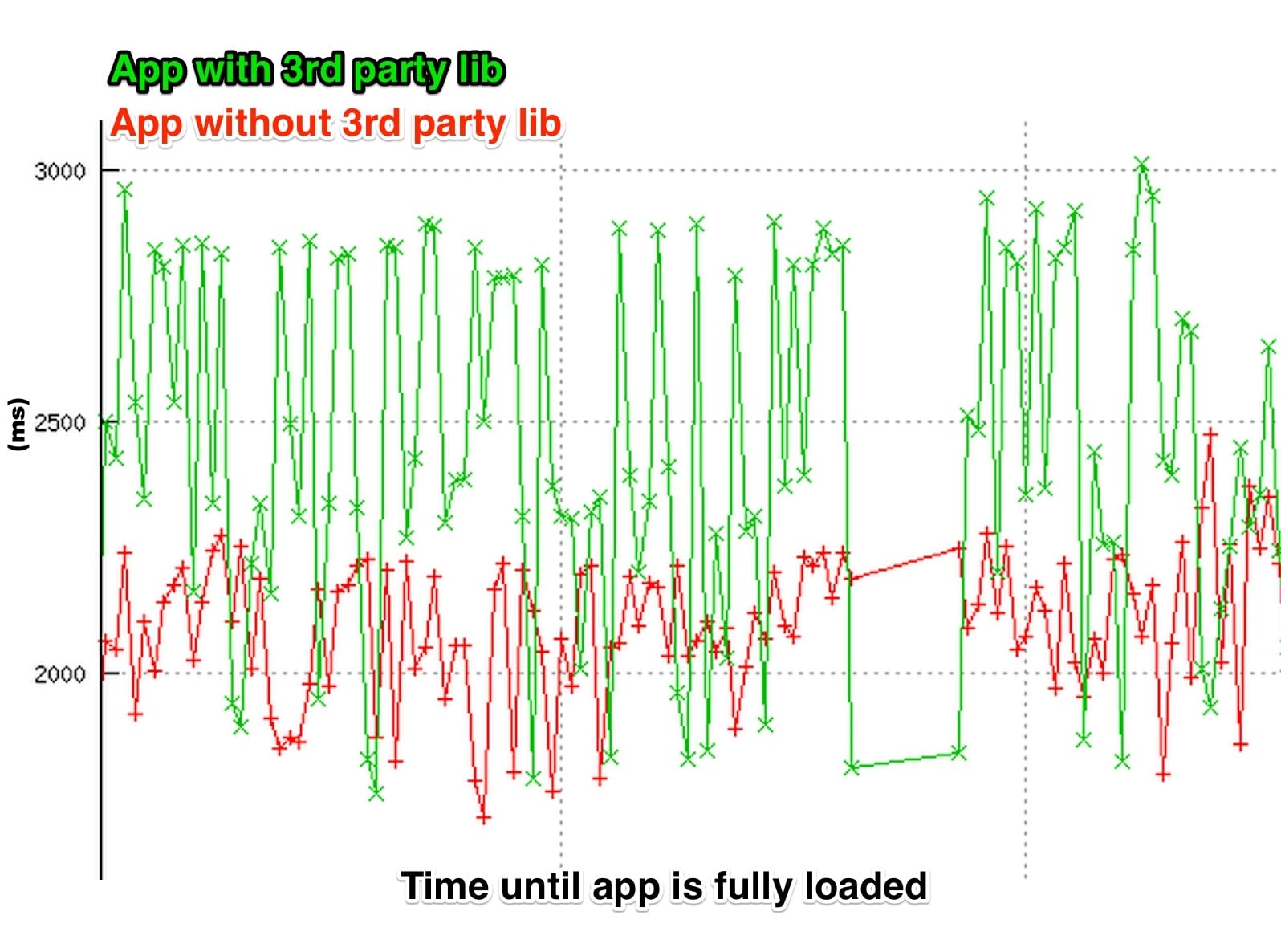
The graph shows load time of our app over time. In cases where the third party script finished downloading before our internal scripts, it delayed time to interactivity and the execution of our own scripts by nearly a full second. It was essentially a race condition based on how fast the third party script loaded.
To fix this issue, we decided the library in question was not important enough to keep so we got rid of it. If we needed to keep it however, we could have tried to defer its loading or wait for some internal hook that says "it's ok for non-critical elements to load now".
Before you add that latest and greatest Javascript library or add another request to your app, remember that asynchronous does not mean fast. Take the time to understand the performance costs of adding more requests to your page.