We recently migrated hundreds of ZooKeeper instances from individual server instances to Kubernetes without downtime. Our approach used powerful Kubernetes features like endpoints to ease the process, so we’re sharing the high level outline of the approach for anyone who wants to follow in our footsteps. See the end for important networking prerequisites.
#Traditional ZooKeeper Migrations
ZooKeeper is the foundation of many distributed systems, allowing them a powerful platform to rendezvous to take attendance and form clusters. Behind the scenes, it relies on a comparatively basic approach to forming clusters: each server instance has a config file listing all of the member hostnames and numeric ids, and all servers have the same list of servers, like this:
server.1=host1:2888:3888server.2=host2:2888:3888server.3=host3:2888:3888Each server has a unique file called myid to tell it which numeric id it corresponds to in that list.
Adding and removing hosts can be done as long as a key rule isn’t violated: each server must be able to reach a quorum, defined as a simple majority, of the servers listed in its config file. The traditional way to migrate a ZooKeeper server to a new instance involves, at a high level:
- Configure and start a new host with “server.4=host:4…” in its server list
- Update the config files on the existing hosts to add the new server entry and remove the retired host from their server list
- Rolling restart the old hosts (no dynamic server configuration in the 3.4x branch)
- Update connection strings in clients (perhaps just changing CNAME records if clients re-resolve DNS on errors)
The downside of this approach is many config file changes and rolling restarts, which you might or might not have solid automation for. When we set out to move ZooKeeper to Kubernetes we started thinking about this approach, but figured out an easier way. Safer too, because in our experience each new leader election has a small risk of taking long enough to bring down the systems relying on them.
#New Approach
Our approach involves wrapping existing ZooKeeper servers in Kubernetes services and then does one-for-one server-to-pod replacements using the same ZooKeeper id. This requires just one rolling restart to reconfigure existing ZK instances, then shutting down the servers one by one. We won’t get into the weeds on the ways to configure Kubernetes topologies for ZooKeeper here, nor the low-level readiness checks, because there are many ways to do that with various pros and cons. The concepts discussed below work the same no matter the top-level topology.
We’ll proceed in five steps:
- Complete prerequisites to ensure our ZooKeeper cluster is ready to migrate
- Create ClusterIP services in Kubernetes that wrap ZooKeeper services
- Configure ZooKeeper clients to connect to ClusterIP services
- Configure ZooKeeper server instances to perform peer-to-peer transactions over the ClusterIP service addresses
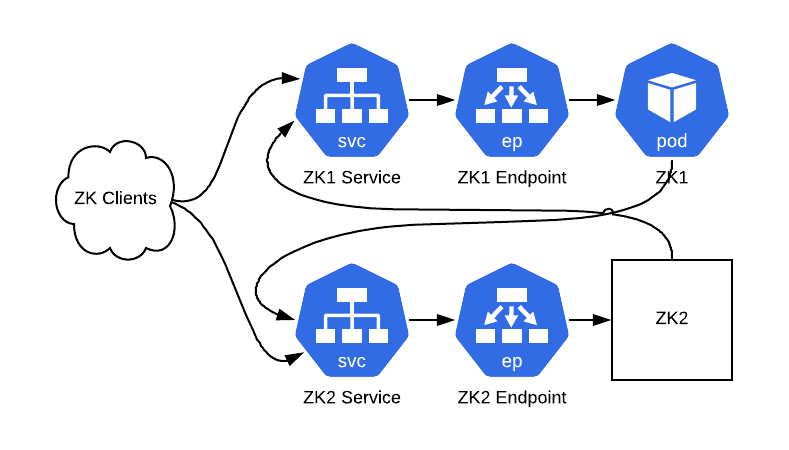
- Replace each ZooKeeper instance running on a server with a ZooKeeper instance in a Kubernetes pod
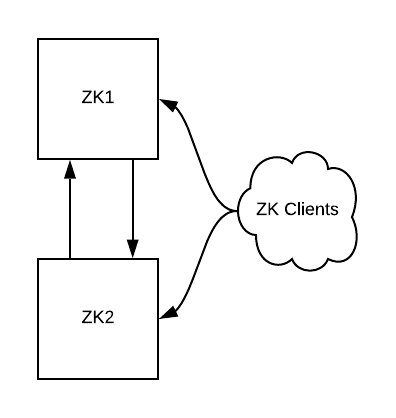
For each of the steps below, we’ll include a diagram of our infrastructure topology. The diagrams will contain only two ZooKeeper instances for ease of understanding, even though one wouldn’t want to ever create a cluster with fewer than three.
Complete Prerequisites
Starting with a working ZooKeeper cluster, we’ll want to ensure that services on the host are capable of communicating with our Kubernetes cluster. We include a few ways to accomplish that at the end of this article.
Create ClusterIP Services
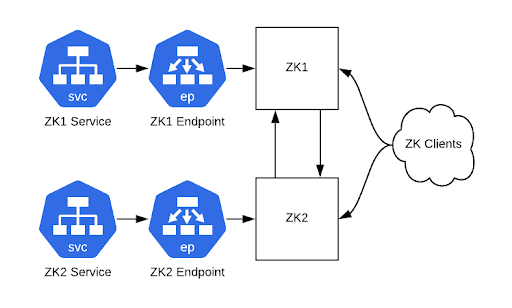
Create a ClusterIP service with matching Endpoint resources for each ZooKeeper server. They should pass the client port (2181) as well as the cluster-internal ports (2888,3888). With that done you should be able to connect to your ZooKeeper cluster via those service hostnames. Kubernetes ClusterIP services are useful here because they give you static IP addresses that act as load balancers to backend pods. In this case we're using them with a 1:1 mapping of service to pod so that we have a static IP address for each pod.
Reconfigure Clients
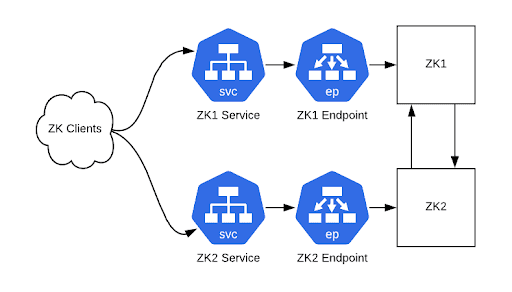
Once you’re able to connect to your ZooKeeper cluster via Kubernetes ClusterIP services, this is a good time to pause to reconfigure all your clients. If you’re using CNAME records in ZooKeeper connection strings, change the DNS records. Restart all the clients if they don’t have recent clients that will re-resolve DNS entries on connection failures. If you’re not using CNAME records then you’ll need to roll out new connection strings and restart all client processes. At this time, old and new connection strings will still work.
Reconfigure ZooKeeper Instances
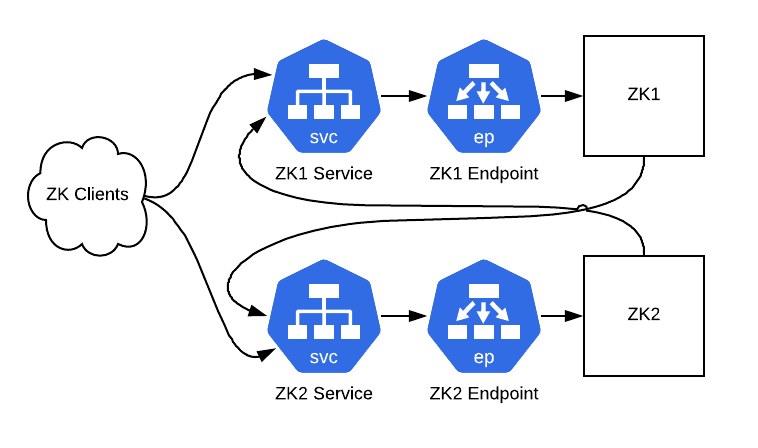
Next up, we’ll make our ZooKeeper servers do their peer-to-peer communication via those ClusterIP services. To do this, we’ll modify the config files to incorporate the addresses of the ClusterIP services. It’s also essential to configure the zk_quorum_listen_all_ips flag here: without it the ZK instance will unsuccessfully attempt to bind to an ip address that doesn’t exist on any interface on the host, because it's a Kube service IP.
server.1=zk1-kube-svc-0:2888:3888server.2=zk2-kube-svc-1:2888:3888server.3=zk3-kube-svc-2:2888:3888zk_quorum_listen_all_ips: trueRolling restart those hosts and now we’re ready to start replacing hosts with pods.
Replace ZooKeeper Hosts with Pods
One server at a time we’ll do the following steps:
- Select a ZK server and its corresponding ClusterIP service
- Shut down ZK process on the server
- Start a pod configured with the same server list and myid file as the shut-down ZK server
- Wait until ZK in the pod has started and synced data from the other ZK nodes
That’s it, your ZooKeeper cluster is now running in Kubernetes with all of the previous data.
#Networking Prerequisites
For these steps to work well, there’s some network setup to handle. You need to take steps to ensure the following:
- Kubernetes pod IP addresses need to be routable from all servers that need to connect to ZooKeeper
- All servers connecting to ZooKeeper must be able to resolve Kubernetes service hostnames
- Kube-proxy must be running on all servers that need to connect to ZooKeeper so that they can reach the ClusterIp services
These can be accomplished in a few ways. We use an in-house network plugin similar to Lyft's https://github.com/lyft/cni-ipvlan-vpc-k8s plugin or AWS's https://github.com/aws/amazon-vpc-cni-k8s which assign AWS VPC IP addresses to pods directly, instead of using a virtual overlay network, so all of our pod IPs are routable from any instance. Overlay networks like flannel (https://github.com/coreos/flannel) would work too, as long as all of your servers are attached to the overlay network.